



Update Section : Binance Pay
We’ve updated our deposit system! Binance Pay deposits are now available as a separate option instead of the Crypto section for a smoother experience.
Step-by-Step Deposit Guide
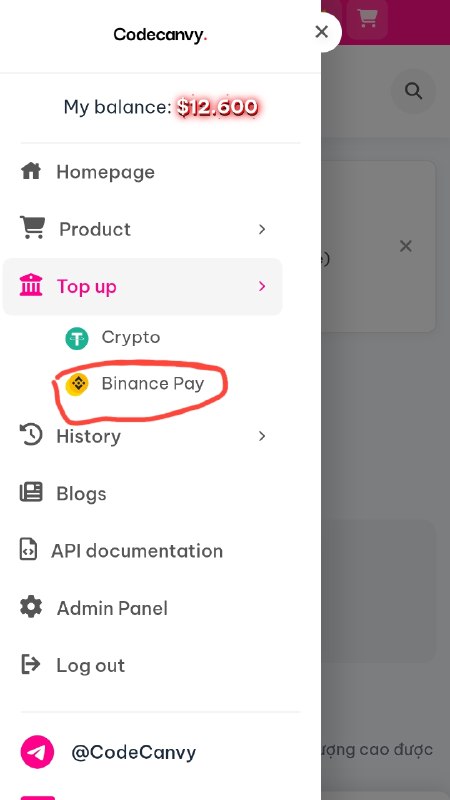
Step 1: Select Binance Pay
Go to Top Up and choose Binance Pay instead of Crypto.
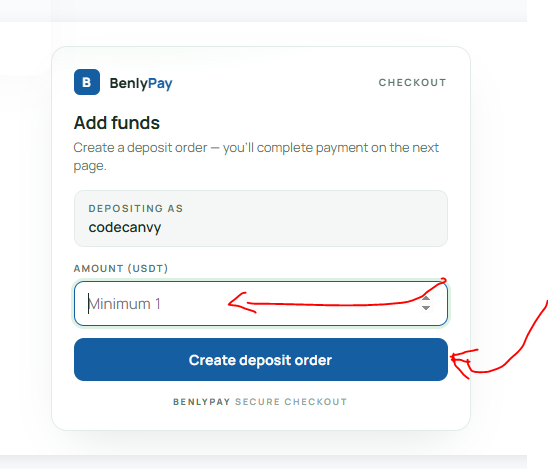
Step 2: Enter Amount
Enter your deposit amount and click Create deposit order.
Step 3: Send Payment
You will see the payment page with the exact amount, QR code, and Binance Pay ID. Send the exact amount shown using your Binance app.
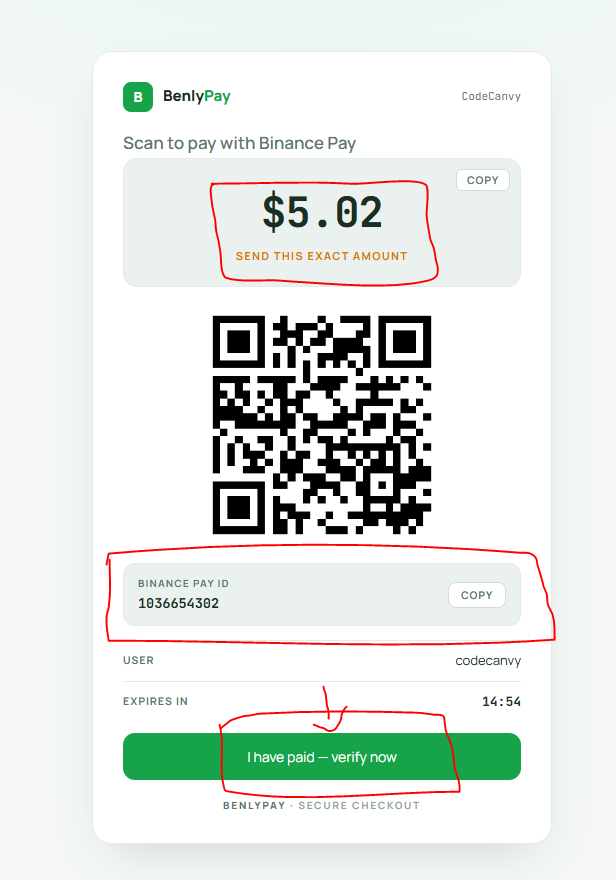
⚠️ Important: Always send the exact amount shown to avoid issues.
Step 4: Verify Payment
After paying, click "I have paid — verify now".
❗ Mandatory Step: If you don’t click this button, your deposit will NOT be successful.
Quick Summary
- Select Binance Pay
- Enter amount & create order
- Send exact amount
- Click "I have paid — verify now"